
I quite often work in Power BI with smaller semantic models used for quick ad-hoc reporting, PoCs, and similar scenarios. Across different data sources, I regularly need to create the same types of DAX measures over and over again. In my case, these are most often various sums, averages, and record counts. On top of that, I frequently need measures for tracking changes compared to previous periods (e.g. previous month, previous year), including both absolute and percentage changes. Sometimes I also add color-based measures for conditional formatting, and suddenly this turns into a fairly large amount of repetitive, boring code that has to be written manually.
That’s why I created a macro for Tabular Editor 3 that significantly speeds up this process. Here it is.
Generated measures
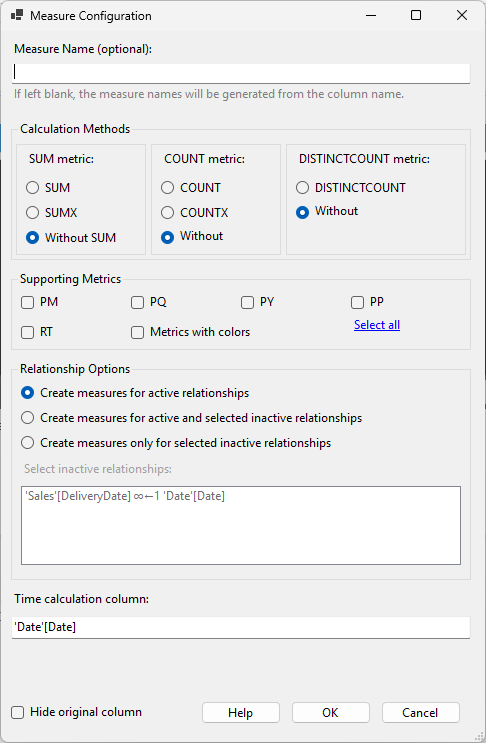
The script is based on my own needs and may not fully match yours. However, it should be clear enough to adjust to your preferences. At its core, it allows you to create the following measures for a selected column:
- SUM or SUMX for totals
- COUNT or COUNTX for record counts
- DISTINCTCOUNT for counting unique values
For each of these base measures, the script can also generate the following additional measures:
- PM (Previous Month) – value for the previous month
- PQ (Previous Quarter) – value for the previous quarter
- PY (Previous Year) – value for the previous year
- PP (Period over Period) – absolute change compared to the previous period
- RT (Running Total) – cumulative total
For these additional measures, the macro also creates measures for the difference between the current value and the previous period (e.g. MoM, YoY) as well as percentage changes (e.g. MoM %, YoY %). Finally, it adds measures for conditional formatting that return a color based on the value (green for growth, red for decline), in two variants: font color and background color.
Last but not least, the macro also supports creating measures over inactive relationships between tables (using the USERELATIONSHIP function).
Semantic model preparation
The semantic model does not require any special preparation. The only requirement is the existence of a default date table that is connected to other tables where you want to create time-intelligence measures. By default, the macro assumes that the table is named Date and contains a column Date[Date]. If your table or column names differ, you need to adjust the macro configuration (see below).
Together with the first generated measure, helper measures defining colors for conditional formatting are also created in the model. These are placed in a predefined table called 00 MEASURES. If you want these measures elsewhere, you need to update the configuration accordingly. The same applies to the actual color values, which can also be changed in the configuration.
Creating the macro in Tabular Editor
- Open Tabular Editor 3 (this will not work in earlier versions) and in the File menu select New → New C# Script.
- Copy the code below into the script window.
- Adjust the configuration to your needs (see below).
- In the C# Script menu, select Save as Macro. Enter a macro name and make sure that Column is checked in the Macro context section. This ensures the macro is available when you right-click a column in a table.
Configuration options
At the very beginning of the macro code, you will find the --- CONFIG --- section, where you can adjust the following values:
// --- CONFIG ---
string DEFAULT_DATE_TABLE = "Date"; // Name of the default date table
string DEFAULT_DATE_COLUMN = "Date"; // Name of the default date column
...DEFAULT_DATE_TABLE– name of the table containing the date column for time intelligenceDEFAULT_DATE_COLUMN– name of the date column in the date tableDEFAULT_DATE_COLUMN_EXAMPLE– example format for entering the date columnDEFAULT_FORMAT_STRING– default format string for generated measuresMEASURES_TABLE_NAME– name of the table where color measures for conditional formatting will be createdCOLORS_FOLDER– name of the folder where color measures will be placedPREFIX_SUM,PREFIX_COUNT,PREFIX_DISTINCTCOUNT– prefixes for generated measure namesALT_REL_FOLDER– name of the folder for measures created over inactive relationshipsCOLOR_GREEN,COLOR_GREEN_BG,COLOR_RED,COLOR_RED_BG– colors for conditional formatting
DAX code of generated measures
The default DAX code is designed to fit my own use cases. If you want to change how the measures are calculated, you can do so directly in the relevant parts of the macro.
The generated measures can, of course, be further modified. In fact, I often rewrite the prepared SUMX measures into a form where values from different columns are multiplied in each iteration. The original measures still serve as a solid starting point for me.
Example DAX code for a SUM measure on column Sales[Amount]
---------------------------
-- Measure: [Ʃ Sales total]
---------------------------
MEASURE Sales[Ʃ Sales total] = SUM('Sales'[Amount])
    , Description = "This measure is the SUM of 'Sales'[Amount]."
    , DisplayFolder = "\Ʃ Sales total"
    , FormatString = "#,##0"

------------------------------
-- Measure: [RT Ʃ Sales total]
------------------------------
MEASURE Sales[RT Ʃ Sales total] = VAR __lastvisibledate = MAX('Date'[Date]) RETURN CALCULATE([Ʃ Sales total], 'Date'[Date] <= __lastvisibledate)
    , Description = "This measure is the running total of 'Sales'[Amount]."
    , DisplayFolder = "\Ʃ Sales total\RT"
    , FormatString = "#,##0"

------------------------------
-- Measure: [Ʃ Sales total PM]
------------------------------
MEASURE Sales[Ʃ Sales total PM] = CALCULATE([Ʃ Sales total], CALCULATETABLE(DATEADD('Date'[Date], -1, MONTH)))
    , Description = "This measure is the SUM of 'Sales'[Amount] for the previous month."
    , DisplayFolder = "\Ʃ Sales total\PM"
    , FormatString = "#,##0"

-------------------------------
-- Measure: [MoM Ʃ Sales total]
-------------------------------
MEASURE Sales[MoM Ʃ Sales total] =
    VAR _currentp = [Ʃ Sales total]
    VAR _previous = [Ʃ Sales total PM]
    VAR _result = IF(NOT ISBLANK(_previous) && NOT ISBLANK(_currentp), _currentp - _previous)
    RETURN _result
    , Description = "This measure is the difference between current and previous month SUM of 'Sales'[Amount]."
    , DisplayFolder = "\Ʃ Sales total\PM"
    , FormatString = "#,##0"

---------------------------------
-- Measure: [MoM Ʃ Sales total %]
---------------------------------
MEASURE Sales[MoM Ʃ Sales total %] = DIVIDE([MoM Ʃ Sales total], [Ʃ Sales total PM])
    , Description = "This measure is the percentage change between current and previous month SUM of 'Sales'[Amount]."
    , DisplayFolder = "\Ʃ Sales total\PM"
    , FormatString = "#,##0.0%"

--------------------------------------
-- Measure: [_color MoM Ʃ Sales total]
--------------------------------------
MEASURE Sales[_color MoM Ʃ Sales total] = VAR __result = [MoM Ʃ Sales total] RETURN SWITCH(TRUE(), __result > 0, [_color_green], __result < 0, [_color_red], BLANK())
    , DisplayFolder = "\Ʃ Sales total\PM"
    , FormatString = "Text"

-----------------------------------------
-- Measure: [_color_bg MoM Ʃ Sales total]
-----------------------------------------
MEASURE Sales[_color_bg MoM Ʃ Sales total] = VAR __result = [MoM Ʃ Sales total] RETURN SWITCH(TRUE(), __result > 0, [_color_green_bg], __result < 0, [_color_red_bg], BLANK())
    , DisplayFolder = "\Ʃ Sales total\PM"
    , FormatString = "Text"

------------------------------
-- Measure: [Ʃ Sales total PQ]
------------------------------
MEASURE Sales[Ʃ Sales total PQ] = CALCULATE([Ʃ Sales total], CALCULATETABLE(DATEADD('Date'[Date], -1, QUARTER)))
    , Description = "This measure is the SUM of 'Sales'[Amount] for the previous quarter."
    , DisplayFolder = "\Ʃ Sales total\PQ"
    , FormatString = "#,##0"

-------------------------------
-- Measure: [QoQ Ʃ Sales total]
-------------------------------
MEASURE Sales[QoQ Ʃ Sales total] =
    VAR _currentp = [Ʃ Sales total]
    VAR _previous = [Ʃ Sales total PQ]
    VAR _result = IF(NOT ISBLANK(_previous) && NOT ISBLANK(_currentp), _currentp - _previous)
    RETURN _result
    , Description = "This measure is the difference between current and previous quarter SUM of 'Sales'[Amount]."
    , DisplayFolder = "\Ʃ Sales total\PQ"
    , FormatString = "#,##0"

---------------------------------
-- Measure: [QoQ Ʃ Sales total %]
---------------------------------
MEASURE Sales[QoQ Ʃ Sales total %] = DIVIDE([QoQ Ʃ Sales total], [Ʃ Sales total PQ])
    , Description = "This measure is the percentage change between current and previous quarter SUM of 'Sales'[Amount]."
    , DisplayFolder = "\Ʃ Sales total\PQ"
    , FormatString = "#,##0.0%"

--------------------------------------
-- Measure: [_color QoQ Ʃ Sales total]
--------------------------------------
MEASURE Sales[_color QoQ Ʃ Sales total] = VAR __result = [QoQ Ʃ Sales total] RETURN SWITCH(TRUE(), __result > 0, [_color_green], __result < 0, [_color_red], BLANK())
    , DisplayFolder = "\Ʃ Sales total\PQ"
    , FormatString = "Text"

-----------------------------------------
-- Measure: [_color_bg QoQ Ʃ Sales total]
-----------------------------------------
MEASURE Sales[_color_bg QoQ Ʃ Sales total] = VAR __result = [QoQ Ʃ Sales total] RETURN SWITCH(TRUE(), __result > 0, [_color_green_bg], __result < 0, [_color_red_bg], BLANK())
    , DisplayFolder = "\Ʃ Sales total\PQ"
    , FormatString = "Text"

------------------------------
-- Measure: [Ʃ Sales total PY]
------------------------------
MEASURE Sales[Ʃ Sales total PY] = CALCULATE([Ʃ Sales total], CALCULATETABLE(DATEADD('Date'[Date], -1, YEAR)))
    , Description = "This measure is the SUM of 'Sales'[Amount] for the previous year."
    , DisplayFolder = "\Ʃ Sales total\PY"
    , FormatString = "#,##0"

-------------------------------
-- Measure: [YoY Ʃ Sales total]
-------------------------------
MEASURE Sales[YoY Ʃ Sales total] =
    VAR _currentp = [Ʃ Sales total]
    VAR _previous = [Ʃ Sales total PY]
    VAR _result = IF(NOT ISBLANK(_previous) && NOT ISBLANK(_currentp), _currentp - _previous)
    RETURN _result
    , Description = "This measure is the difference between current and previous year SUM of 'Sales'[Amount]."
    , DisplayFolder = "\Ʃ Sales total\PY"
    , FormatString = "#,##0"

---------------------------------
-- Measure: [YoY Ʃ Sales total %]
---------------------------------
MEASURE Sales[YoY Ʃ Sales total %] = DIVIDE([YoY Ʃ Sales total], [Ʃ Sales total PY])
    , Description = "This measure is the percentage change between current and previous year SUM of 'Sales'[Amount]."
    , DisplayFolder = "\Ʃ Sales total\PY"
    , FormatString = "#,##0.0%"

--------------------------------------
-- Measure: [_color YoY Ʃ Sales total]
--------------------------------------
MEASURE Sales[_color YoY Ʃ Sales total] = VAR __result = [YoY Ʃ Sales total] RETURN SWITCH(TRUE(), __result > 0, [_color_green], __result < 0, [_color_red], BLANK())
    , DisplayFolder = "\Ʃ Sales total\PY"
    , FormatString = "Text"

-----------------------------------------
-- Measure: [_color_bg YoY Ʃ Sales total]
-----------------------------------------
MEASURE Sales[_color_bg YoY Ʃ Sales total] = VAR __result = [YoY Ʃ Sales total] RETURN SWITCH(TRUE(), __result > 0, [_color_green_bg], __result < 0, [_color_red_bg], BLANK())
    , DisplayFolder = "\Ʃ Sales total\PY"
    , FormatString = "Text"

------------------------------
-- Measure: [Ʃ Sales total PP]
------------------------------
MEASURE Sales[Ʃ Sales total PP] = VAR __min = MIN('Date'[Date]) VAR __max = MAX('Date'[Date]) VAR __days = DATEDIFF(__max, __min, DAY) -1  RETURN CALCULATE ([Ʃ Sales total], DATEADD('Date'[Date], __days, DAY))
    , Description = "This measure is the SUM of 'Sales'[Amount] for the previous period."
    , DisplayFolder = "\Ʃ Sales total\PP"
    , FormatString = "#,##0"

-------------------------------
-- Measure: [PoP Ʃ Sales total]
-------------------------------
MEASURE Sales[PoP Ʃ Sales total] =
    VAR _currentp = [Ʃ Sales total]
    VAR _previous = [Ʃ Sales total PP]
    VAR _result = IF(NOT ISBLANK(_previous) && NOT ISBLANK(_currentp), _currentp - _previous)
    RETURN _result
    , Description = "This measure is the difference between current and previous period SUM of 'Sales'[Amount]."
    , DisplayFolder = "\Ʃ Sales total\PP"
    , FormatString = "#,##0"

---------------------------------
-- Measure: [PoP Ʃ Sales total %]
---------------------------------
MEASURE Sales[PoP Ʃ Sales total %] = DIVIDE([PoP Ʃ Sales total], [Ʃ Sales total PP])
    , Description = "This measure is the percentage change between current and previous period SUM of 'Sales'[Amount]."
    , DisplayFolder = "\Ʃ Sales total\PP"
    , FormatString = "#,##0.0%"

--------------------------------------
-- Measure: [_color PoP Ʃ Sales total]
--------------------------------------
MEASURE Sales[_color PoP Ʃ Sales total] = VAR __result = [PoP Ʃ Sales total] RETURN SWITCH(TRUE(), __result > 0, [_color_green], __result < 0, [_color_red], BLANK())
    , DisplayFolder = "\Ʃ Sales total\PP"
    , FormatString = "Text"

-----------------------------------------
-- Measure: [_color_bg PoP Ʃ Sales total]
-----------------------------------------
MEASURE Sales[_color_bg PoP Ʃ Sales total] = VAR __result = [PoP Ʃ Sales total] RETURN SWITCH(TRUE(), __result > 0, [_color_green_bg], __result < 0, [_color_red_bg], BLANK())
    , DisplayFolder = "\Ʃ Sales total\PP"
    , FormatString = "Text"
Full code
The complete macro code is available on my GitHub.